How to check what ChatGPT actually says about your store (takes about 5 minutes)
Your customers are already asking AI about your place. “Is the shop on Northern Blvd open right now?” “Who’s got cheap gas nearby?” “Does anyone around here carry La Marca?”
You should know what it’s telling them.
Recently, I ran the check on my own store. Here’s what came back:
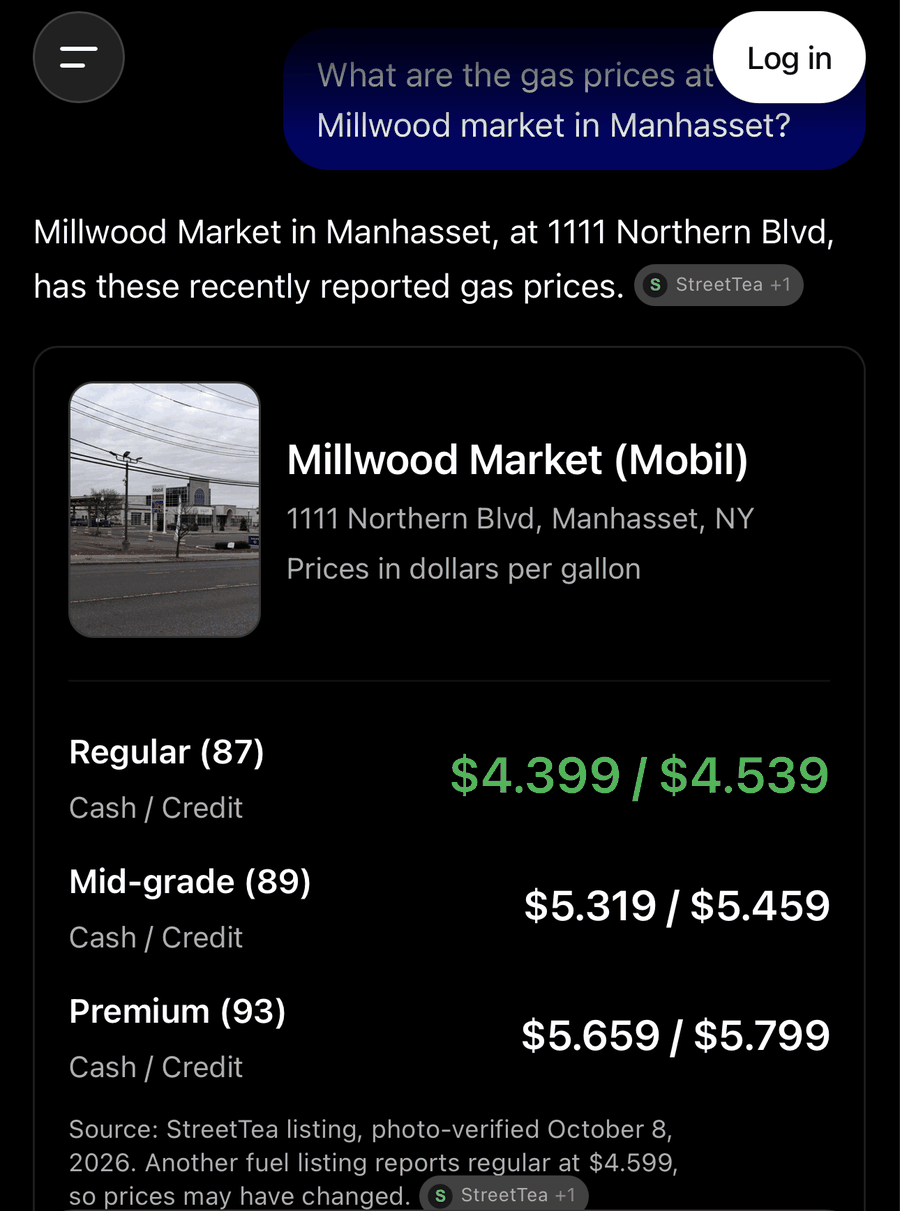
The prices were spot on for regular, mid-grade, and premium and it included the cash and credit breakdown. They pulled straight from a photo I snapped of the fuel pump on October 8th. But look at the picture attached to it. That isn’t my store. It’s from a news article about a station up in Colonie, near Albany, which is around 150 miles away. ChatGPT needed an image, couldn’t find one belonging to my store and just grabbed something it deemed good enough.
That’s how AI works. It answers with whatever it scrapes together, and it doesn’t bother to double-check. Which means you have to.
Here is how to do it:
1. Log out first
Open up a private or incognito window. Your logged-in account remembers your history and location; your customers’ accounts don’t. You want to see what a stranger sees.
2. Ask the questions your customers ask
Don’t just type in your store name. Ask the way a real person would:
- “Where can I grab gas near [your town]?”
- “Is [your store] open right now?”
- “What kind of stuff does [your store] carry?”
- “Who has [specific item] near [your town]?”
3. Score every answer
For each one, check if it:
- Got it right: correct hours, address, prices, and inventory.
- Got it wrong: outdated hours or prices, wrong photo.
- Made things up: hallucinated deals or products you’ve never stocked.
- Punted: gave the lazy cop-out, “I’d recommend calling the store.” (Don’t brush this off—most people won’t call. They’ll just drive to the competitor where the AI actually gave an answer.)
- Sent them elsewhere: routed them straight to a chain or a competitor.
4. Click the sources
ChatGPT usually shows you where each piece of info came from. Treat that as your immediate to-do list. That’s how I tracked down where that random Colonie photo came from. If it’s quoting a forgotten Yelp review from 2019 or an ancient version of your website, that’s what needs fixing.
5. Quick run in Gemini and Perplexity
They pull from entirely different indexes and will give you different answers. Worth taking the extra time to check.
What to fix first
- Google Business Profile: Hours, photos, and categories. Gemini leans on this heavily.
- Bing Places: Most owners completely ignore it, but ChatGPT’s search draws heavily on Bing data.
- Apple Business Connect: This is what feeds Siri and Apple Maps.
- Your website: If your site has old hours or old pricing listed anywhere, AI will repeat them with absolute confidence.
What none of those fix
None of those platforms tell AI what’s actually sitting on your shelves right now, what’s written on your menu board, or when it was last updated. That’s why my pricing came back right—StreetTea turned my photos into a dated record that AI trusted over the older, conflicting listings. (That wrong photo is a gap we’re closing on our end, too.)
Run the check when you have time. If you don’t like what you see out there, try creating a Storefront.
(Tested October 11th, 2026, logged out, ChatGPT on iPhone)